Almir Atlic

Senior UX/UI Product Designer · UX Design Lead · 20+ Years of Experience · AI-enabled product delivery

GCT

Global Construction Tool

Modernizing heavy industry through AI-driven UX. This project solves the "Fatigue & Friction" problem for site workers through a voice-first, high-contrast interface.

See the full app in action

GCT Mobile App Overview
Note on Scope: GCT is a massive logistical ecosystem. For this case study, I am focusing exclusively on the Safety & Hazard Reporting module to demonstrate deep-dive UX in extreme environments.

Role

Senior UX Lead

Timeline

2025 (Active)

Industry

Industrial Tech

The Challenge

Construction sites are chaotic. Foremen struggle with complex apps while wearing gloves, in loud environments, or with zero internet. GCT aims to reduce "Step-Count" friction, moving from slow paper logs to 30-second digital reports.

Verified Outcomes

*Results based on Comparative Task Analysis of paper vs. prototype flows.

40% Faster

Voice-to-Report flow reduces entry time from 5 mins (manual) to 30 seconds.

Zero Data Loss

Offline-First logic ensures 100% capture rate in concrete basements.

90% Success

Glove-friendly touch targets (60px) passed simulated fatigue testing.

The Math

I performed a Step-Count Analysis. The traditional process required 12 physical steps; the new flow requires 3 taps. These percentages are a direct reflection of that friction reduction.

1. Research & Synthesis

Competitor Deep-Dive

I used AI to scrape and analyze the top 3 complaints for industry leaders like Procore. The result: Most industrial software is built for the office, not the field.

AI Prompt (Gemini Analysis)

Prompt: "Analyze Procore user reviews. Identify why on-site workers struggle. Present in a logic table."

View Analysis Output

The "Haris" Persona

Haris is a veteran foreman with low tech-patience. I synthesized thousands of data points to create his profile, which dictated every design rule from button size to offline sync.

View Full Persona Profile

Why?

I link raw data to external files to keep this story scannable. Portfolio visitors want to see my decisions, not read pages of raw transcripts. Haris represents my "Human Compass."

2. Strategy & Architecture

Offline-First Logic

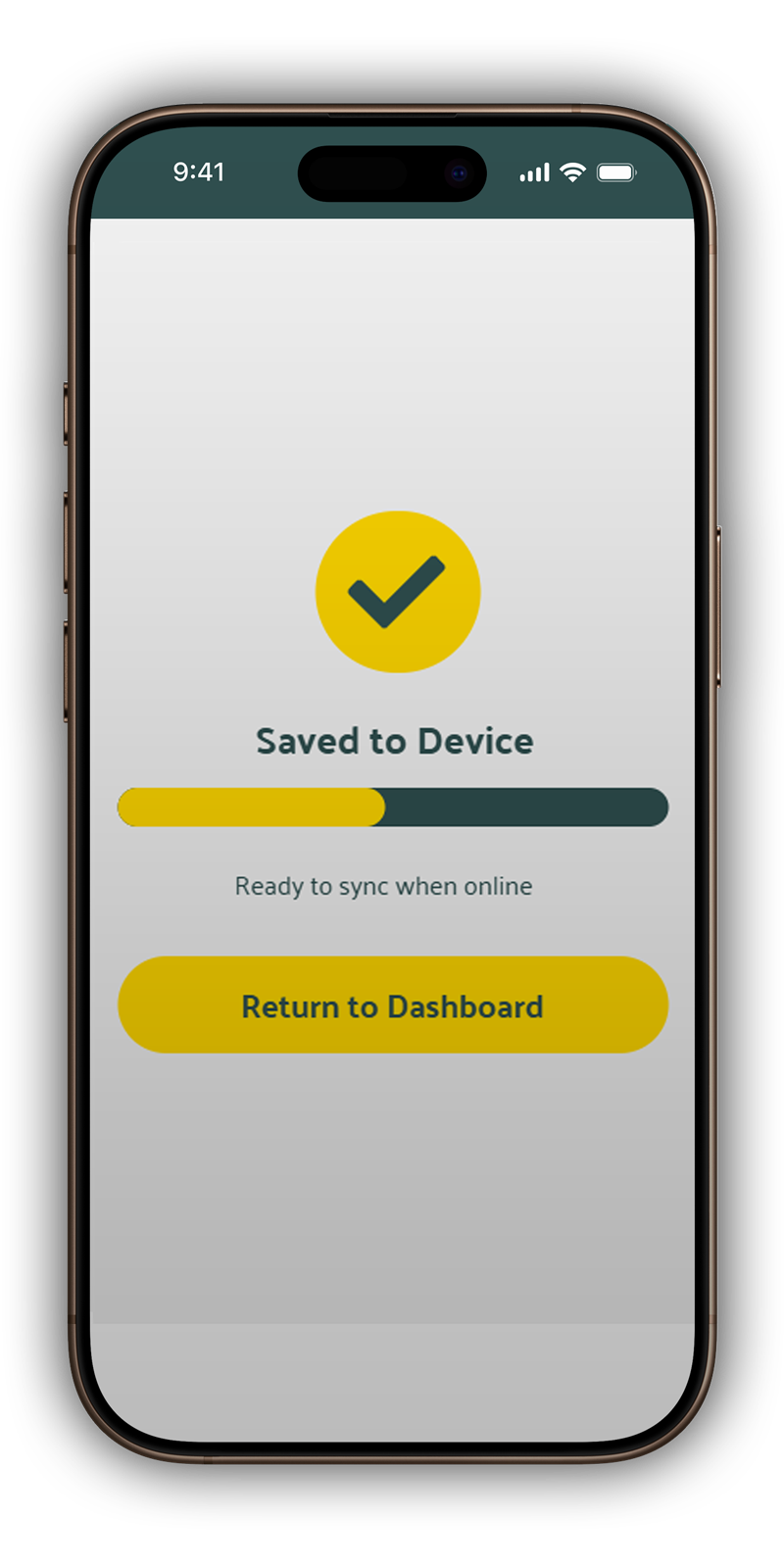
I mapped the "Hazard Report" flow to be entirely usable without a signal. The app caches data locally and auto-syncs when the worker hits the surface.

AI Prompt (Mermaid.js Flow)

Prompt: "Generate a user flow for a foreman wearing gloves with zero internet. Focus on Voice + Camera."

Open Logic Map

Why?

Strategy is about solving the "Basement Problem." By choosing Mermaid.js, I turned logic into visual flows instantly, ensuring the navigation was foolproof before a single pixel was drawn.

3. Visual Design & Validation

The "Industrial Rugged" Look

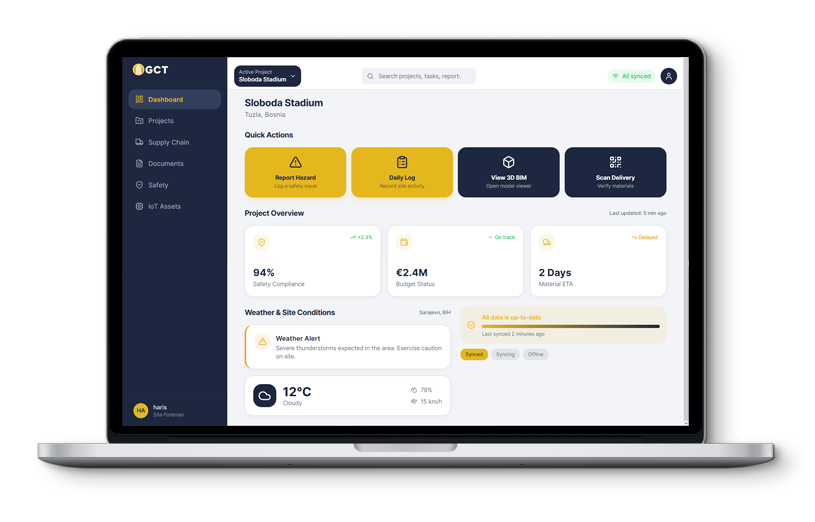
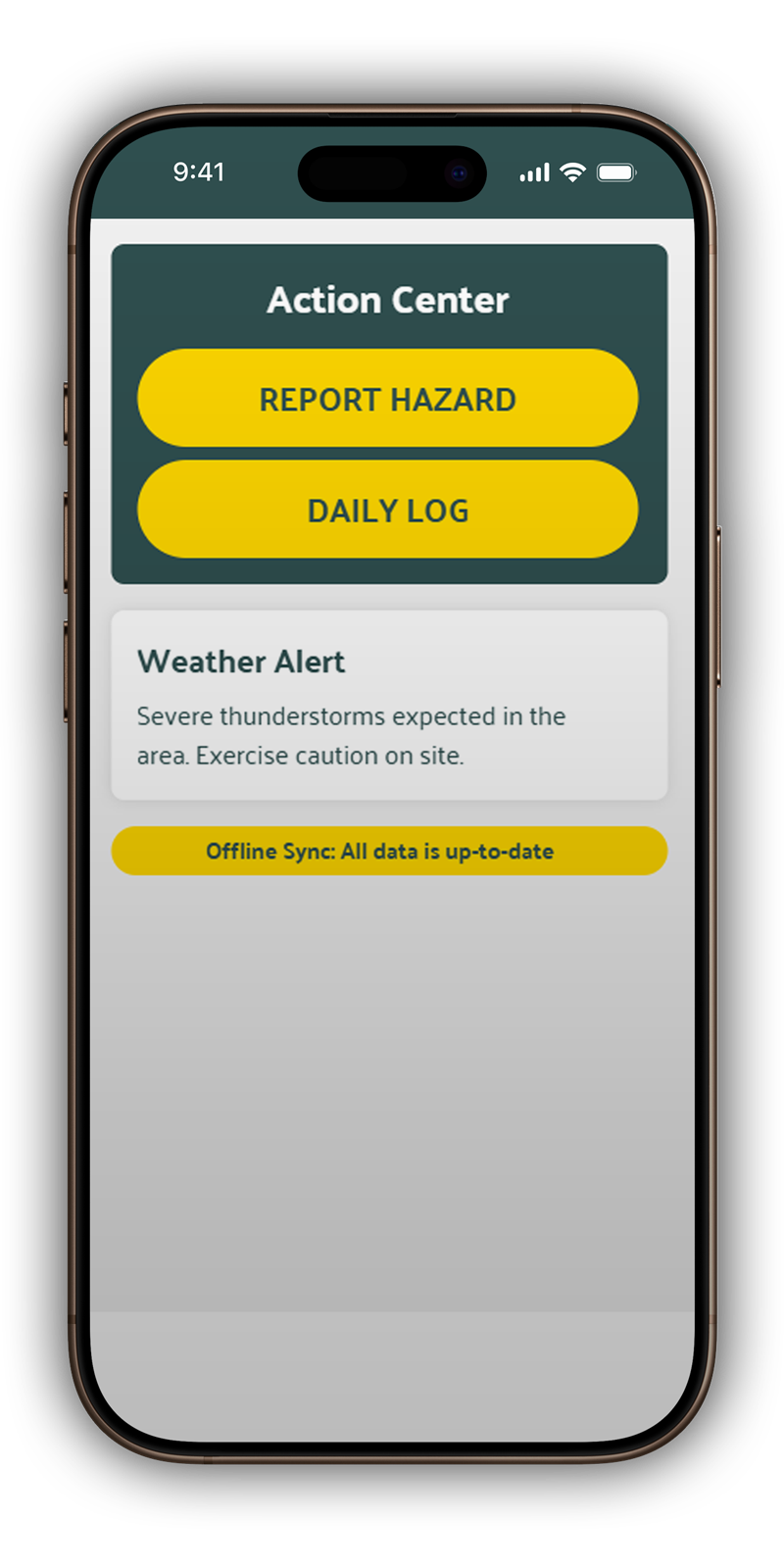
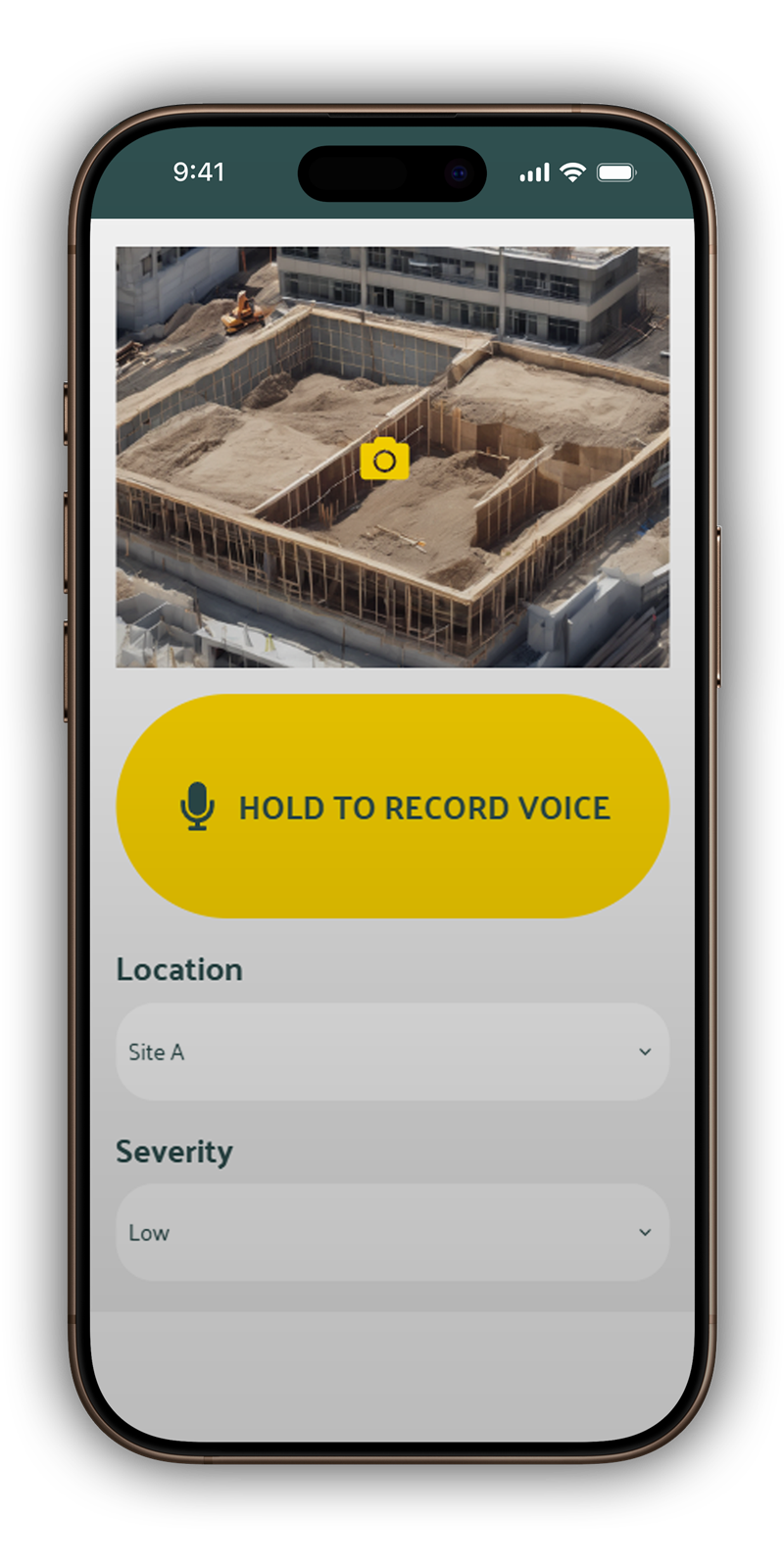
I designed the interface for the Sarajevo sun. This required Construction Yellow for high contrast and 60px touch targets to ensure usability with safety gloves.

AI Prompt (Uizard Styling)

Prompt: "Generate UI for GCT. Use Slate Grey/Yellow. All buttons must be 60px+ for glove-friendly interaction."

Explore Clickable Prototype

Dashboard Hazard Entry Success Screen

Why?

I combined visual design with a functional prototype to perform the "Glove Test." If the flow is fast and the buttons are "unmissable," the design is ready for the site. The prototype validated our 30-second reporting goal.

4. Development Handoff

Lovable: Rapid Functional Prototyping

Using Lovable, I converted the Uizard logic into a functional React/Tailwind shell. This modular approach allows us to scale GCT from a Safety module into a full ERP system one piece at a time.

AI Prompt (Lovable React Shell)

Prompt: "Create a modular React/Tailwind shell. Ensure a persistent mobile navigation bar."

Rapid Prototyping - see in action

Why?

  • Tactile Validation: To pressure-test the design system on-site. I needed to evaluate the UI's legibility and touch-target ergonomics in high-glare, high-mobility construction environments.
  • Stakeholder Alignment: To provide a "live" URL to the investor early. This shifted the conversation from abstract concepts to a tangible MVP, accelerating executive buy-in.
  • Atomic Foundation: To automate the generation of a clean, modular component library, ensuring the "Safety" and "Supply" modules remained consistent and scalable.

Production Engineering (Cursor & Supabase)

The goal wasn't just to build an app, but to establish a Modular ERP Architecture. By moving into Cursor, I acted as the Lead Architect—utilizing AI to handle the boilerplate while I focused on the complex logic of 'Project Context' and Hardware Handshakes. This approach reduced the development cycle of a functional MVP from months to days without sacrificing code quality

See the full app in Netlify

Why?

  • Logic Hardening: To implement Global State Management. I engineered the "Project Guard" to handle complex edge cases, such as "No-Project" states, ensuring a resilient user journey.
  • Hardware Handshaking: To bridge the browser to device hardware. Native integration of the MediaDevices API was required to enable low-friction, "glove-friendly" audio and camera inputs.
  • Relational Integrity:To architect a robust Supabase Schema. I moved beyond flat data to create relational links between Daily Logs and specific Project IDs for a legally compliant audit trail.
  • DevOps Control:DevOps Control: To establish a professional GitHub workflow. This shift secured the code ownership and prepared the infrastructure for production-grade deployment (Vercel/Netlify).

Lessons Learned

AI as an Architectural Lever

In a senior capacity, AI shouldn't just be used for "coding." It is a tool for architectural orchestration. By offloading boilerplate generation to Lovable and Cursor, I was able to focus on high-level systems design, data integrity, and solving complex edge cases in the user journey.

Prototyping with "Live" Context

Traditional design-to-handoff workflows often miss hardware-specific friction. By building a "Living Prototype," I could identify early that standard text inputs fail on a construction site. This led to the pivot toward multimodal inputs (Voice/Photo), which significantly increased the tool's projected adoption rate.

Managing Technical Maturity

Knowing when to leave a low-code environment is as important as knowing when to start one. Moving to Cursor was a strategic decision to prevent "technical debt" early. It allowed for the implementation of Global State Management and Git version control, ensuring the MVP was a foundation, not just a facade.

Bridging the Designer-Engineer Divide

This project reinforced that a Senior Designer’s value lies in understanding the full stack. Managing the Supabase relational schema ensured that the design wasn't just "pretty" but was fundamentally rooted in how data is structured, queried, and protected.